
Home / Guide
How to Use Blox Fruits Scripts: Sources, Loaders & Common Errors
On this page
- What Does Using a Blox Fruits Script Mean?
- Understand the Parts of a Script Setup
- How to Get a Blox Fruits Script
- How to Download a Blox Fruits Script
- How to Use a Blox Fruits Script: General Workflow
- How to Tell Whether a Script Actually Works
- Common Beginner Mistakes
- Troubleshooting Blox Fruits Script Errors
- Account Rules and Download Risks
- How to Learn Roblox Scripting With Studio
- Frequently Asked Questions
- Conclusion
Blox Fruits scripts are pieces of code intended to perform tasks inside the Roblox game. A script hub may group several tools into one menu. A loader is a short snippet that retrieves more code from a source address. These parts are different from an executor, which provides the environment used to run the script.
Also read: Blox Fruits executor guide, are Blox Fruits scripts safe and Redz Hub script.
To use a third-party Blox Fruits script, you need its complete code and an execution environment that supports its requirements. The usual process involves checking the source, opening the relevant script editor, entering the code, and following the documented execution steps. Some hubs then require a separate access key. There is no single setup process that works for every script, executor, and device.
This guide explains how to find scripts, understand download options, and check each loading stage. You’ll learn why copying code into Roblox chat does not execute it. We’ll also cover common errors and the difference between using third-party scripts and learning Roblox development. No live executor setup or gameplay test was performed for this article.
What Does Using a Blox Fruits Script Mean?
People use “scripting” to describe two different activities. One is running third-party code while playing a game. The other is writing code for an experience you own or have permission to edit. Knowing which one you mean helps you choose the right tools and instructions.
Running a Third-Party Script
A third-party script comes from someone outside the game’s normal player controls. It may depend on functions supplied by a separate execution environment. The script’s publisher should explain those requirements. A copied snippet alone does not establish that your setup supports them.
Writing Your Own Roblox Code
Roblox Studio provides tools for building, scripting, testing, and publishing experiences. It is the appropriate starting point if you want to learn game development. You can write code and test it in projects you control. Installing Studio does not grant editing access to another creator’s live game.
Understand the Parts of a Script Setup
Before following instructions, identify what each download or snippet actually contains. A script file is different from an application installer. A hub’s access key can also be separate from the executor’s key. The table below explains the main terms.
| Term | Meaning | What to check |
|---|---|---|
| Script | Code containing instructions | Publisher and requirements |
| Loader | Code that retrieves or starts more code | Destination address |
| Script hub | Several tools grouped in an interface | Features and access rules |
| Executor | Software used to run supplied scripts | Platform and function support |
| Access key | Credential for a particular service | Issuer and current conditions |
| Error output | Messages explaining a failure | Exact wording and loading stage |
How to Get a Blox Fruits Script
Start with an identifiable project source rather than a generic download button. A useful listing names the hub, links to its publisher, and shows the complete loader. It should also explain what was checked and what remains unknown. Our Blox Fruits Script Collection brings together source references and verification notes.
Identify the Publisher
Check the account, repository, and filename behind a shared snippet. For example, the Redz Hub repository publishes its loader under tlredz/Scripts. That gives you a specific source to compare with copied listings. It does not by itself prove that every feature works or that the code has been audited.
Compare the Complete Loader
Compare the URL and surrounding code with the publisher’s example. Look for missing brackets, changed filenames, or extra characters. A small copying error can make the snippet invalid. A different destination can also mean you are loading a different project.
Review Requirements and Known Issues
Look for documentation naming the supported platform and execution environment. Check whether it describes the current release. A dated screenshot is weaker evidence than a clear compatibility report. Keep missing information marked as unknown rather than assuming support.
How to Download a Blox Fruits Script
Some projects provide text to copy, while others provide a script file. A remote loader may download its additional code when it runs. That means you may not need a separate file named after the hub. Always check what the offered download contains.
| What you see | What it may be | Important distinction |
|---|---|---|
| Code block | Loader or script text | Copying it does not execute it |
| Raw source link | File contents shown as text | The source can change |
| .lua or .luau file | Script source | Still needs a suitable environment |
| .txt file | Text that may contain code | Extension alone does not establish behavior |
| .exe or .apk file | Application package | Different from a plain script snippet |
| Repository ZIP | Project files | Not necessarily an installable application |
A “Download” label is not enough to identify the file. Read the project instructions before opening an application package. Do not assume an installer belongs to the hub just because its filename includes the same name. Publisher identity and file purpose need separate checks.
How to Use a Blox Fruits Script: General Workflow
The steps below explain the common loading sequence. Exact button names and software requirements vary between projects. Follow current documentation for the specific platform and release involved. Treat successful loading and working gameplay features as separate checks.
Step 1: Check the Supported Environment
Confirm your operating system and the script’s documented requirements. Windows support does not automatically include Android, iOS, or macOS. Scripts may also depend on functions that differ between executors. Tools such as sUNC test selected executor functions, but those results do not guarantee every script will work.
Step 2: Check That Roblox Works Normally
Open Blox Fruits through the official Roblox application and check ordinary gameplay. Note any existing crashes, connection errors, or control problems. This gives you a baseline for later troubleshooting. A problem that already occurs without third-party tools should not automatically be blamed on a script.
Step 3: Open the Documented Script Editor
Find the code-entry area described by the execution environment’s instructions. Make sure it is not an access-key field or search box. These fields accept different kinds of input. Roblox chat is also not a general script editor.
Step 4: Enter the Complete Code
Paste the full published snippet into the appropriate editor. Preserve straight quotation marks, brackets, capitalization, and the entire address. Do not include the surrounding article text or Markdown code-fence marks. Compare the result with the source before proceeding.
Step 5: Follow the Execution Instructions
Use the action documented for your particular software version. Button names and connection steps may differ, so an unrelated tutorial may not match. Watch for the first error instead of repeatedly triggering the same action. Record whether the failure happens before or after the hub interface appears.
Step 6: Complete Any Separate Hub Access Check
Some hubs ask for their own key after loading starts. That key may be different from the executor’s access credential. Read the prompt carefully to identify which service is requesting it. Your Roblox password and recovery codes are not script access keys.
Step 7: Check the Interface and Intended Feature
Confirm that the menu responds and can be closed and reopened. Then assess the specific option you wanted to use. A farming feature, for example, needs more evidence than a visible farming tab. Record the relevant result rather than labeling the entire hub “working.”
How to Tell Whether a Script Actually Works
A useful check answers a specific question. Did the loader retrieve its code, did the menu open, or did a particular feature complete its task? Those are different outcomes. Report them separately so the result is clear.
| Check | What success establishes | What it does not establish |
|---|---|---|
| Source file opens | The address returned content | Code safety or compatibility |
| Loader runs without an immediate error | Initial execution progressed | Every dependency loaded |
| Menu appears | Interface code reached that stage | Gameplay features work |
| One feature succeeds | That feature worked under those conditions | All features or platforms work |
| Key is accepted | Access check passed | Account safety |
Keep the software versions and test conditions with any working-status note. A later update can change the result. A script can also work on one platform and fail on another. Avoid turning a single successful action into a universal claim.
Common Beginner Mistakes
Many confusing failures begin with the wrong input or an outdated instruction. Check those simple details before making broad changes. You may be dealing with a copying error rather than a device problem. The examples below explain common misunderstandings.
Pasting Code Into Roblox Chat
Chat handles messages and supported game commands. It does not execute an arbitrary loader pasted into the message field. Other players may simply see the code as text. Use the distinction between chat and a script editor to understand why nothing happens.
Mixing Executor and Hub Keys
Two products can have separate access systems. A key accepted by one may be meaningless to the other. Check the name on the prompt and the service that issued the key. Repeatedly pasting the wrong credential will not resolve that mismatch.
Using Incomplete or Changed Code
A missing bracket can stop code from being read correctly. Curved quotation marks copied from formatted text can also cause problems. Check for shortened URLs and text added inside the snippet. Compare against the publisher’s complete example.
Following Outdated Instructions
An older guide may describe different menus or dependencies. The project’s current release may no longer match those steps. Check the actual version rather than relying on the year in a page title. If current instructions are unavailable, leave the setup unconfirmed.
Troubleshooting Blox Fruits Script Errors
Start with the first error and the stage where it occurs. Keep the source URL, platform, and software versions in your notes. Change one relevant detail at a time so you can judge the result. The table below lists possible causes, not guaranteed diagnoses.
| Problem | Possible cause | First check |
|---|---|---|
| Syntax error | Incomplete or incorrectly formatted code | Compare the full snippet |
| Source request fails | Wrong URL or unavailable remote file | Publisher’s current address |
| Required function is missing | Unsupported dependency | Documented function requirements |
| Menu does not appear | Loading or compatibility failure | Error output |
| Key is rejected | Wrong service, invalid value, or changed access rules | Prompt and issuer |
| Menu opens but feature fails | Feature-specific problem | Selected option and known issues |
| Roblox closes | Runtime conflict or an app problem | Whether normal gameplay also fails |
| Settings disappear | Saving behavior or file support differs | Project documentation |
Do not disable security software just because a random guide calls it a universal fix. A blocked download and a script configuration error are different issues. Likewise, better hardware cannot restore a deleted remote file. Match the investigation to the actual symptom.
Account Rules and Download Risks
Roblox states that cheating and exploiting violate its rules and can lead to account deletion. It also warns that exploit downloads may contain malware or steal personal information. A keyless label or familiar project name does not remove those risks. Never share your account password, session cookie, or recovery codes to obtain a script.
How to Learn Roblox Scripting With Studio
If “how to script in Blox Fruits” means learning to build similar game mechanics, start with Roblox Studio. It includes a script editor, testing tools, and device previews. You can develop original quests, menus, and combat systems in your own experience. Keep that learning process separate from altering another creator’s live game.
Begin with a small task that gives a visible result. For example, create a button that changes a part’s color in your own project. Then build toward larger systems through small, testable steps. This makes mistakes easier to understand than copying a large program all at once.
Frequently Asked Questions
These questions cover the differences between finding, copying, and running code. They also explain why one setup does not establish support for every device. Treat each project’s requirements separately. A short answer should still identify the relevant limitation.
Do I Need Roblox Studio to Play Blox Fruits?
No, Studio is a development tool. Playing Blox Fruits uses the Roblox application. Installing Studio does not unlock third-party script execution in someone else’s game. Use it when creating or editing an authorized project.
Can I Use the Same Loader on PC and Mobile?
A project may publish one loader for multiple supported environments. However, matching code does not prove that every platform is supported. Input controls and required functions can differ. Check the documentation for each platform separately.
Does a Script Keep Running After Roblox Closes?
Code running inside a Roblox session stops when that session ends. Keeping the snippet in a text file does not keep it active. A remote loader is not an offline farming service. Any offline-operation claim needs separate evidence.
Why Does the Same Code Produce Different Results?
The setups may use different software versions or available functions. The remote code at a shared URL may also change. Game conditions can affect a particular feature as well. Compare the full setup and error details rather than only the visible loader.
Where Should I Report a Broken Loader?
Use an identifiable support channel provided by the relevant publisher. Include the source address, versions, and exact error message. Explain whether the failure happened during loading, access checking, or gameplay. Remove private credentials before sharing any logs.
Conclusion
Using a Blox Fruits script starts with understanding the source and its requirements. Keep the loader, executor, hub key, and gameplay features separate when following instructions. Check errors at the stage where they occur instead of relying on a universal fix. Use the Blox Fruits Script Collection to compare published hub sources.
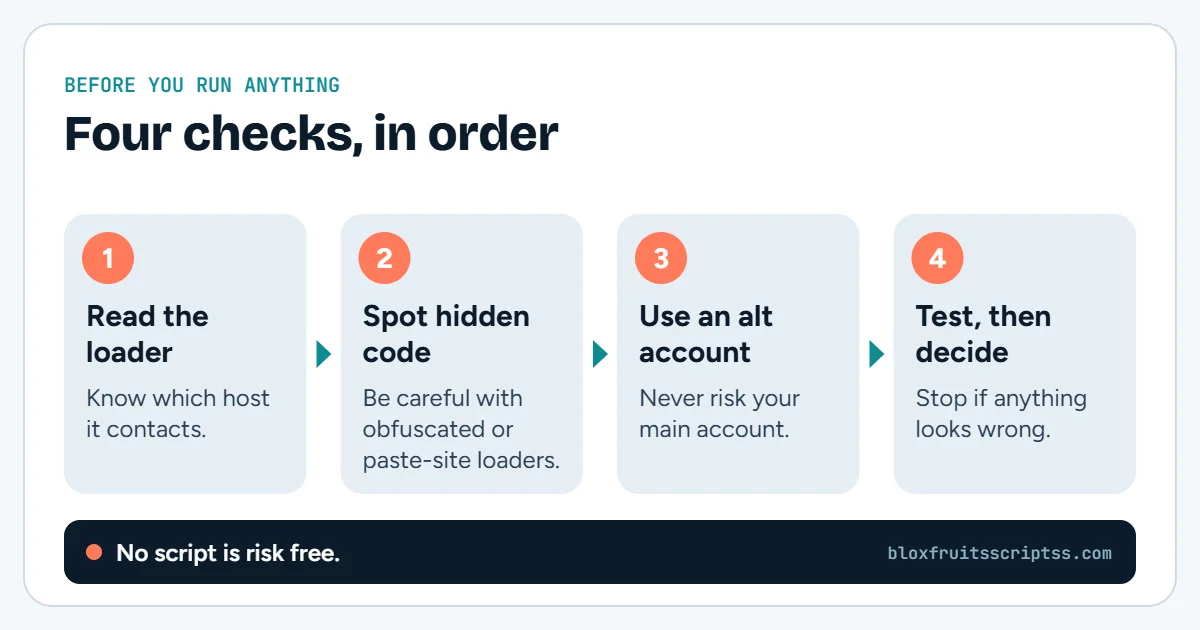
Before you run anything: using scripts in Roblox breaks the Roblox Terms of Service and can lead to a ban. Use an alternate account and check every source yourself.
Keep reading
More Blox Fruits guides
Hacks and cheats
Blox Fruits hacks are third-party tools or scripts advertised as ways to change gameplay or automate tasks. Players…
Fruit Rain script
A Blox Fruits fruit rain script is advertised as code that makes fruits appear or fall around players. The name can…
Auto raid scripts
A Blox Fruits auto raid script is third-party code that aims to automate parts of a raid. Players look for these…
PvP scripts
A Blox Fruits PvP script is third-party code that claims to automate parts of player combat. PvP means “player versus…
Official sources: Roblox Terms of Use and Roblox Community Standards.