
Home / Guide
Blox Fruits Executor: Compatibility, Script Support & Troubleshooting
On this page
- What Is a Blox Fruits Executor?
- Blox Fruits Executor: Quick Overview
- Executor Compatibility for Blox Fruits
- How to Compare Blox Fruits Executors
- Features to Check in an Executor
- Keyless, Key-Based, and Paid Executors
- How to Check an Executor Before Downloading
- How Executors and Script Loaders Work Together
- Common Blox Fruits Executor Problems
- Is a Blox Fruits Executor Safe?
- Can Using an Executor Get You Banned?
- Roblox Studio vs Third-Party Executors
- Frequently Asked Questions
- Conclusion
A Blox Fruits executor is third-party software used to run scripts in the Roblox game client. The executor provides the environment, while the script contains instructions for particular actions. A script hub may bring several tools together in one menu. These tools are separate from the official Roblox application and Roblox Studio.
Also read: Delta Blox Fruits script, Fluxus Blox Fruits script and are Blox Fruits scripts safe.
If you’re searching for a Blox Fruit executor, start with platform support and script requirements. A Windows version does not automatically work on Android, iPhone, or Mac. Key requirements, supported functions, and software updates can also affect compatibility. No executor was installed or tested in live gameplay for this guide, so it does not present a verified “best working” ranking.
This guide explains how executors, loaders, and script hubs fit together. You’ll learn what compatibility claims mean and how to understand common errors. It also covers access keys, download risks, and Roblox’s rules. For published hub loaders, visit our Blox Fruits Script Collection.
What Is a Blox Fruits Executor?
An executor attempts to run user-supplied code within the Roblox client environment. A script can then use the functions available in that environment. Those functions vary, which helps explain why the same script may behave differently across setups. Running code on your device does not automatically give it control over the game’s server.
Executor vs Script vs Script Hub
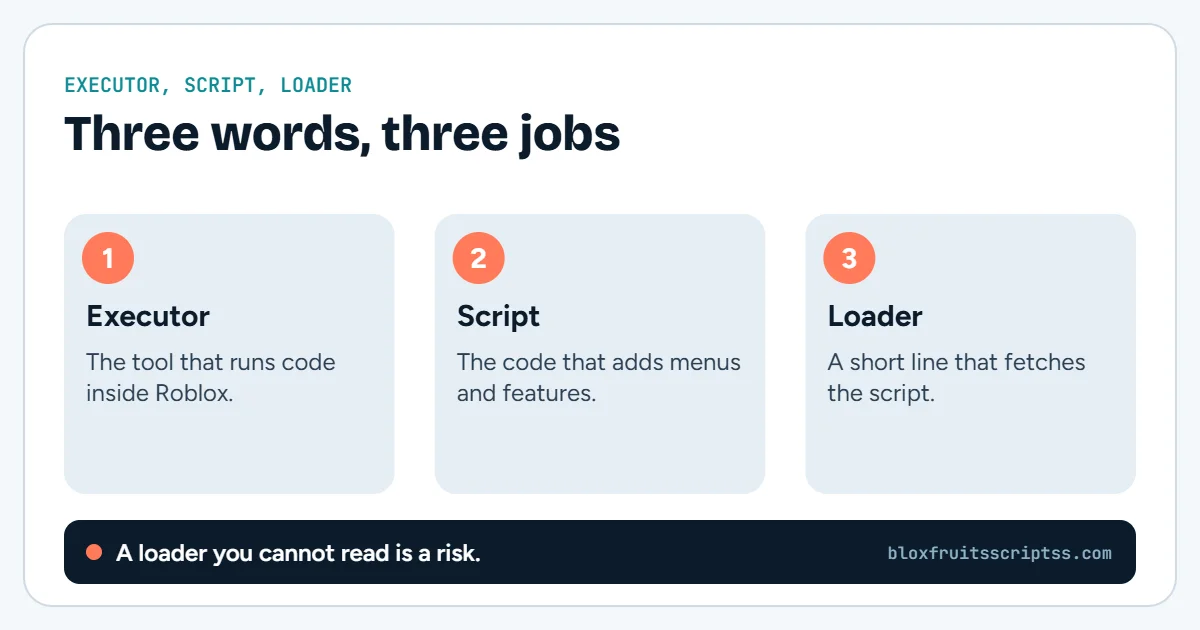
These terms describe different parts of a setup. The executor runs code, while the script defines what that code should do. A script hub groups tools and settings inside an interface. A problem with one part does not necessarily mean every other part is broken.
| Term | Simple meaning | Example of its role |
|---|---|---|
| Executor | Software that runs supplied scripts | Provides an execution environment |
| Script | Code containing instructions | Defines an action or menu |
| Script hub | A collection of script tools | Groups features into tabs |
| Loader | Short code that retrieves or starts more code | Loads a hub from a remote address |
| Access key | A project’s access credential | Unlocks access where required |
What Does a Loadstring Do?
loadstring turns a string of code into a function in environments that support it. Calling the returned function then runs that code. In a common remote loader, a separate request first downloads the text from a URL. The visible loader therefore may show only a small part of what eventually runs.Blox Fruits Executor: Quick Overview
Compatibility involves several separate checks. Your device must support the software, and the software must provide what the script needs. The downloaded script must also work with the current game. Use this overview to identify which part of a claim needs evidence.
| Check | What you need to establish |
|---|---|
| Publisher | Who maintains the project |
| Download source | Where the publisher distributes it |
| Platform | Exact supported operating system |
| Version | Which release the instructions describe |
| Script support | Required functions and known limitations |
| Access model | Keyless, key-based, paid, or mixed |
| Gameplay status | What was actually tested |
| Account risk | Roblox’s rules still apply |
Executor Compatibility for Blox Fruits
Compatibility is more specific than a “works with Roblox” label. A release may support some functions while lacking others. A script may also depend on a feature that changed after an update. Check the platform, executor version, and script requirements together.
Windows
Look for documentation that names the supported Windows setup. Record the release version rather than relying on an old video title. Desktop menus also need usable mouse input and keyboard controls. Windows-specific instructions belong with that release, not with an unrelated mobile download.
Android
Android compatibility needs its own documentation. A Windows program cannot be treated as an Android app simply because both use the same script text. Touch controls and mobile app behavior also need checking. A menu opening on a phone does not prove that every gameplay tool works.
iPhone and iPad
Check iOS and iPadOS support separately from Android. A publisher’s general “mobile” claim may not explain which devices it covers. Look for current platform-specific instructions and stated limitations. Missing information should remain unconfirmed rather than being filled in by guesswork.
macOS
A Mac can run supported Roblox software without supporting a Windows executor. The operating system and software dependencies are different. A familiar project name does not establish a working Mac release. Follow separate macOS documentation where it exists.
How to Compare Blox Fruits Executors
A useful comparison should show evidence rather than stars or unsupported scores. Start with source identity, documented platforms, and release information. Then compare the functions needed by the script you want to assess. No product ranking is included here because current release-level testing was not performed.
| Comparison point | Useful evidence | What it does not prove |
|---|---|---|
| Publisher source | Consistent project documentation | That every download is harmless |
| Platform support | Named operating systems and versions | Support for all devices |
| Function support | Documented functions and test results | Compatibility with every script |
| Recent update | Dated release notes | That all bugs are fixed |
| Keyless access | Published access requirements | Better safety or performance |
| Paid access | Clear price and service terms | Reliable gameplay |
| Gameplay test | Named feature, version, and test conditions | Future compatibility |
What Do UNC and sUNC Claims Mean?
You may see executor pages advertise UNC or sUNC results. The sUNC project describes its tool as checking whether selected executor functions behave as expected. A result concerns those tests, not every possible script or game feature. It should not be treated as a malware audit, Roblox approval, or a guarantee against account penalties.
Features to Check in an Executor
An interface should make it clear what code is loaded and what happens when it fails. Useful controls include readable text input, error output, and clear version details. File features also need documentation because scripts may rely on saved settings. The points below are evaluation criteria, not promises about every executor.
Script Editor and Text Input
A script editor lets you view and change the supplied code. It should preserve quotation marks, brackets, and line breaks. Clear text helps you spot a cut-off URL or incomplete snippet. A polished editor alone does not establish reliable execution.
Support for Required Functions
Scripts can depend on functions supplied by their execution environment. If a required function is missing, part of the script may fail. Check the function’s documented behavior rather than only its name. The sUNC documentation exists to describe and test selected functions in this environment.
Error Messages and Logs
Readable errors help identify where execution stopped. A missing function needs a different investigation from a failed download. Save the exact message instead of reporting only that nothing happened. Avoid including passwords or private access keys in shared logs.
Saved Scripts and File Access
Some environments provide file functions for saved settings or script data. The sUNC documentation describes an executor’s virtual file system for these operations. Check the documented storage scope before assuming where files are kept. A save feature also does not prove that downloaded code is trustworthy.
Keyboard and Touch Controls
Desktop users need clear mouse controls and documented shortcuts. Mobile users need buttons that remain reachable on a small screen. A menu should have an obvious way to close and reopen it. Good input design makes the interface usable, but does not confirm its gameplay features.
Version Information and Update Notes
Clear version information helps you match a problem to a release. Update notes should explain what changed and which issues remain. A generic “updated today” label offers little detail on its own. Keep the executor version separate from the script hub’s version.
Keyless, Key-Based, and Paid Executors
These labels describe access arrangements. They do not measure safety or script compatibility. An executor and a script hub can each have their own access requirements. Read both sets of terms before assuming one unlocks the other.
| Access model | Meaning | What to check |
|---|---|---|
| Keyless | No access key required for the stated service | Feature limits or separate paid options |
| Key-based | A valid project key is required | Expiry, renewal, and device restrictions |
| Paid | Payment is required for stated access | Billing period, supported platforms, and refund terms |
| Mixed | Different access rules apply to different tiers | Exactly what each tier includes |
A keyless executor does not remove a script hub’s separate key check. Likewise, buying executor access does not automatically buy access to paid scripts. Keep those products and credentials separate. A Roblox account password is not an executor access key.
How to Check an Executor Before Downloading
Begin with the publisher’s documentation rather than a download button on an unfamiliar page. Check that the platform, version, and access terms agree across the project’s pages. Treat screenshots and anonymous comments as claims that still need support. The checklist below helps organize that review.
- Identify the publisher. Find consistent project documentation and distribution links.
- Check the operating system. Confirm the exact platform rather than assuming “PC” or “mobile” covers everything.
- Review release notes. Look for dated changes and known problems.
- Check script requirements. Compare required functions with the documented environment.
- Review requested permissions. Understand what access the software asks for and why.
- Separate claims from tests. Record which facts come from the publisher and which have been independently checked.
How Executors and Script Loaders Work Together
A typical remote loader first requests code from an address. The execution environment then compiles and runs the returned text if it supports the required operations. That downloaded code may load additional components or display a hub menu. Each stage can fail independently.
This explains why a valid-looking loader may produce no usable result. The remote address could be unavailable, or it could return something other than code. Execution may also stop because a required function is missing. Even when the menu opens, individual gameplay features still need separate checks.
Common Blox Fruits Executor Problems
Start with the exact error and the stage where it appears. Note the operating system, executor version, and script source. Check whether ordinary Roblox gameplay works without the third-party software. The table lists possible explanations rather than guaranteed diagnoses.
| Problem | Possible explanation | What to check |
|---|---|---|
| Executor does not open | Unsupported platform or application failure | Release requirements and error details |
| Roblox version is unsupported | Compatibility has changed | Publisher’s current status and release notes |
| Script does not execute | Incomplete code or execution error | Full snippet and error output |
| Required function is missing | Environment lacks a dependency | Documented function support |
| Loader cannot retrieve code | URL or remote service problem | Current publisher source |
| Key validation fails | Invalid, expired, or mismatched key | Which product issued the key |
| Menu opens but a tool fails | Feature-specific problem | Script project’s known issues |
| Roblox closes unexpectedly | App conflict or runtime failure | Whether the issue occurs without the tool |
An error message is more useful than repeatedly trying the same action. Reinstalling everything can also remove settings without fixing the cause. Check the relevant project’s documented status before making broad changes. If no confirmed fix exists, leave the problem unresolved rather than inventing a workaround.
Is a Blox Fruits Executor Safe?
You cannot establish safety from a familiar name, clean-looking website, or “keyless” label. Roblox warns that some exploits are scams distributing malware or stealing personal information. A security scan is one check, not a guarantee about all future behavior or downloaded code. Never provide your Roblox password, browser session cookie, or recovery codes to unlock a script.
Can Using an Executor Get You Banned?
Using an executor to exploit or cheat can put your Roblox account at risk. Roblox states that exploiting violates its Terms of Use and can lead to account deletion. “Undetected” and “anti-ban” claims do not override those rules. Access to a private server also does not establish an exemption from them.
Roblox Studio vs Third-Party Executors
Roblox Studio is Roblox’s official environment for building, scripting, testing, and publishing experiences. It supports testing your own project with client and server simulations. That is different from running unauthorized code inside someone else’s live game. If your goal is to learn scripting, Studio provides the appropriate development tools.
| Area | Roblox Studio | Third-party executor |
|---|---|---|
| Main purpose | Create and test Roblox experiences | Run supplied scripts in its supported environment |
| Provider | Roblox | Independent publisher |
| Intended context | Projects you own or may edit | Depends on the tool and its use |
| Testing tools | Editor, debugging, and test simulations | Varies by project |
| Official Roblox development workflow | Yes | No |
Frequently Asked Questions
Executor questions often mix up access, compatibility, and account permissions. These are separate issues. Paying for one product does not give it extra authority over Roblox’s servers. The answers below explain common limits.
Is There an Official Blox Fruits Executor?
The reviewed sources do not establish an executor endorsed by Roblox or the Blox Fruits developer. A project calling itself “official” may mean only its own publisher’s website. That wording should not be read as Roblox approval. Roblox’s published guidance warns against exploiting.
Does Every Executor Support Every Script?
No, scripts may require different functions or behaviors. An environment can support one script while failing another. A successful menu load also does not test every feature. Check the requirements of the exact script.
Can I Run Scripts Without an Executor?
You can write and run authorized scripts in your own Roblox Studio projects. That uses Roblox’s normal development tools. It does not give you permission to inject code into another creator’s live experience. Pasting a loader into game chat is not an alternative execution method.
Does a Keyless Executor Remove a Hub’s Key?
No, the two access systems can be independent. The executor may open without a key while the loaded hub still requests one. A hub’s key check is part of that project’s access process. Use its documented requirements rather than assuming executor access covers it.
Can an Executor Give Free Robux or Permanent Fruits?
An executor is not an authorized way to grant Robux or paid items. A changed on-screen value does not prove a real account or inventory change. Roblox’s developer guidance emphasizes server checks for rewards, purchases, and player requests. Treat “free currency” claims as unsupported unless confirmed through legitimate platform systems.
Why Does the Same Script Work in One Setup but Fail in Another?
The setups may use different platforms, versions, or supported functions. The remote code may also have changed between attempts. An old result therefore may not describe the current situation. Compare the exact versions and error messages.
Does Deleting an Executor Undo Account Penalties?
Removing software does not itself reverse a moderation decision. Local files and Roblox account enforcement are separate matters. Do not assume uninstalling erases previous activity. Use the official support process for questions about an account action.
Conclusion
A Blox Fruits executor should be assessed through clear source details, platform support, and script requirements. Keep access claims separate from evidence of working features. Read error messages carefully and consider Roblox’s account rules before using third-party tools. For hub-specific source information, see the complete Blox Fruits Script Collection.
Before you run anything: using scripts in Roblox breaks the Roblox Terms of Service and can lead to a ban. Use an alternate account and check every source yourself.
Keep reading
More Blox Fruits guides
Delta script
A Delta Blox Fruits script is code that players want to run through Delta Executor while playing Blox Fruits on…

Fluxus script
A Fluxus Blox Fruits script is code that players look for to use with Fluxus Executor in Roblox. Fluxus refers to the…
Redz Hub
Redz Hub is a Roblox automation script project published through the tlredz/Scripts GitHub repository. Its…

Gravity Hub
Gravity Hub is a script hub listed for Blox Fruits, the Roblox game. Script directories describe it using terms such…