
Home / Guide
Hoho Hub Script for Blox Fruits: Copy Loader, Keys & Troubleshooting

On this page
- What Is Hoho Hub?
- Hoho Hub: Quick Details
- Hoho Hub Script: Copy the Published Loader
- Hoho Hub Key System Explained
- Hoho Hub Features and Settings
- How to Check Hoho Hub Compatibility
- Hoho Hub Discord: How to Check the Community Link
- How to Load and Review Hoho Hub
- Hoho Hub Troubleshooting
- Safety and Account Risks
- Frequently Asked Questions
- Conclusion
Hoho Hub is a Roblox script project with a published loader under the GitHub account acsu123. Its loading code includes Blox Fruits among the games it recognizes. The short snippet starts a longer loading process rather than containing every gameplay tool. That distinction matters when you check its source or investigate an error.
Also read: Redz Hub script, Blox Fruits auto raid script and how to use Blox Fruits scripts.
If you need the Hoho Hub script for Blox Fruits, the published loader is below. The reviewed loading code contains a key system, so this version should not be described as confirmed keyless. You’ll also find information about its Discord reference and performance prompt. This article reviews source code without claiming live gameplay testing.
The guide explains how to identify the loader, understand access requirements, and narrow down common problems. It separates source facts from device and gameplay claims. You’ll learn why a working menu does not prove every feature works. For other projects, visit our Blox Fruits Script Collection.
What Is Hoho Hub?
A script hub brings several tools together through code and an interface. Hoho Hub is the project discussed here, while an executor is separate software used to run supplied scripts. The two can have different requirements and access systems. Naming both makes compatibility questions easier to understand.
The acsu123/HOHO_H repository provides the source location for the loader used in this guide. Check that identity when comparing snippets from other websites. A familiar logo or matching page title does not prove that two downloads contain the same code. The source address is a more useful starting point.
Hoho Hub: Quick Details
These details describe the material examined for this article. Source review can establish certain loading steps and visible settings. It cannot replace testing on a named device and executor version. Keep that difference in mind when comparing “working script” claims.
| Detail | Information |
|---|---|
| Project | Hoho Hub |
| Source account | acsu123 |
| Published entry file | HOHO_H/main/Loading_UI |
| Next loading file | HohoV2/main/ScriptLoad.lua |
| Access check | Key validation appears in reviewed code |
| Gameplay testing | Not performed |
| Source review date | September 24, 2026 |
Hoho Hub Script: Copy the Published Loader
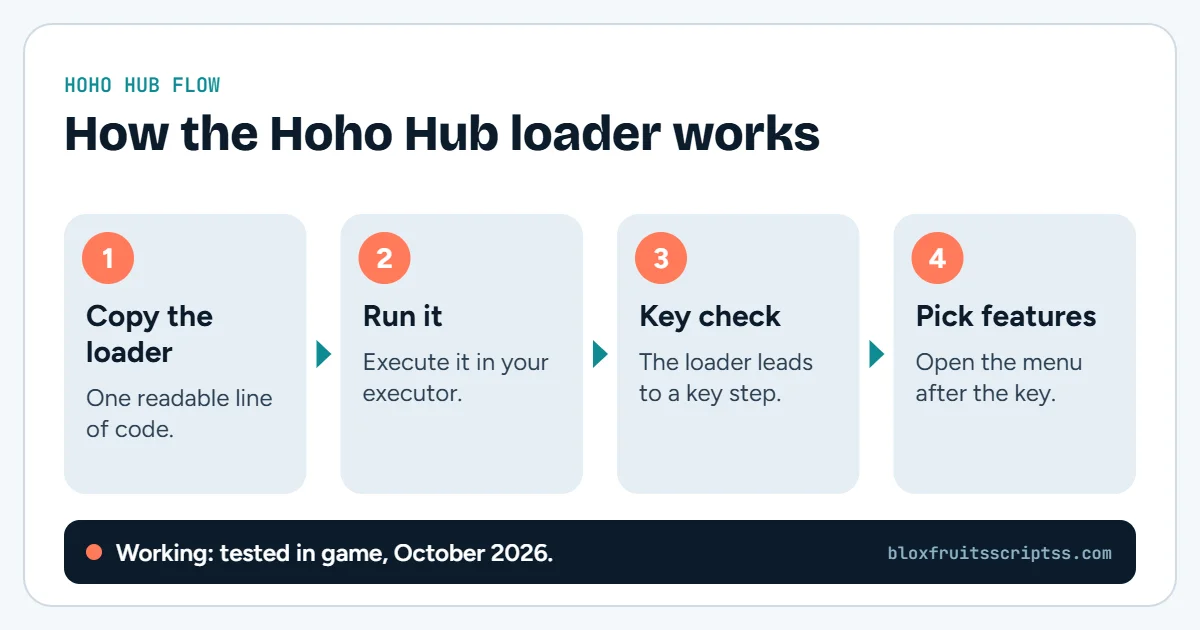
The snippet below points to the project’s published entry file. That file forwards to ScriptLoad.lua in the HohoV2 repository. These are two stages in the loading process, rather than two unrelated snippets to run together. Copy the complete code if you are comparing it with another listing.
loadstring(game:HttpGet("https://raw.githubusercontent.com/acsu123/HOHO_H/main/Loading_UI"))()Source link: Hoho Hub Loading_UI
Is the Copy Link the Full Script?
No, the entry file loads additional code. A short snippet therefore does not show everything that will run. The remote files can also change without changing the copied address. Keep a loader’s availability separate from claims about its complete behavior.
Hoho Hub Key System Explained
The reviewed code uses Luarmor’s API to check a submitted key. It proceeds through the relevant success path when the result is KEY_VALID. It also includes a saved-key file named HohoKeyV4.txt. These findings confirm an access check, but do not establish a universal key lifetime.
Executor Access vs Hoho Hub Access
An executor key and a hub key may unlock different services. Opening an executor does not automatically satisfy the loaded hub’s requirements. A keyless executor can still load a hub that requests its own key. Check which project issued the prompt before trying to fix it.
Invalid or Expired Keys
A rejected key can have more than one cause. It may belong to another service, contain a copying error, or no longer meet the issuer’s rules. Read the actual message before assuming expiry. Follow the project’s current access instructions rather than guessing how long every key lasts.
| Situation | First check |
|---|---|
| Executor accepts a key, but Hoho Hub does not | Whether the two services require separate keys |
| Copied key is rejected | Complete value and issuing service |
| Previously accepted key fails | Current issuer rules and displayed error |
| Validation does not finish | Error output and access-service availability |
Hoho Hub Features and Settings
The loading code reveals access and interface details. It does not establish the current performance of every Blox Fruits tool. Farming, raids, movement, and mastery options need checks against the actual gameplay release. This guide does not label those features tested simply because the loader is readable.
Low-End Performance Setting
The reviewed source includes a Low-End Mode prompt for less powerful devices. It offers a choice and can remember the preference. Its presence is a source finding, rather than a measured frame-rate improvement. No performance benchmark was carried out for this article.
Gameplay Features Need Separate Checks
A feature list should identify the exact task being supported. For example, opening a farming tab is different from completing a quest loop. The same distinction applies to raids, targeting, and movement tools. A useful test names the feature, software version, and conditions involved.
How to Check Hoho Hub Compatibility
Compatibility involves the execution environment, platform, and downloaded code. A familiar hub name cannot establish that all three work together. Look for current instructions covering your specific setup. No mobile or desktop gameplay configuration was tested for this guide.
Executor Requirements
A hub may depend on functions supplied by the executor. A missing function can stop part of the loading process. Record the exact error instead of assuming that a different loader will solve it. Check the project’s documented requirements where available.
Mobile Interface
Mobile users need controls that respond to touch. The panel should fit the screen without blocking essential game buttons. There should also be a reachable way to close and reopen it. A desktop screenshot does not establish those mobile behaviors.
Desktop Interface
Desktop users should check mouse input and documented keyboard shortcuts. A menu can appear while its toggle key conflicts with another control. Window size may also affect whether the panel remains reachable. Interface checks do not replace testing individual gameplay tools.
Hoho Hub Discord: How to Check the Community Link
The reviewed source contains the Discord invite code hohohub. That is a reference found in the loading code, not an independent verification of the invite’s current destination. Community links can change, so check them against current publisher information. Do not treat every server using the same name as the same community.
If you’re searching for a Hoho Hub script Discord link, begin with the project’s own references. Compare the invite and project identity rather than relying on a search-result title. Joining a server also does not itself prove that a script is safe or working. Never share account passwords or recovery codes to obtain support.
How to Load and Review Hoho Hub
Exact controls depend on the execution environment and its current version. The steps below explain what to check without inventing button positions. Keep the published loader, hub access process, and gameplay checks separate. This makes errors easier to trace.
- Check the source. Compare the snippet with the published Loading_UI address.
- Review compatibility. Look for current instructions for the platform and executor involved.
- Preserve the complete code. Keep quotation marks, brackets, and the URL intact.
- Follow the documented execution process. Record any error instead of repeatedly triggering the same action.
- Review the access prompt. Identify whether it belongs to the executor or Hoho Hub.
- Check the result. Assess menu controls and individual features separately.
Hoho Hub Troubleshooting
First, identify the stage where the problem occurs. A failed source request, rejected key, and broken gameplay feature are different issues. Record the source address, software versions, and full error message. The checks below suggest possible causes rather than guaranteed fixes.
| Problem | Possible explanation | What to check |
|---|---|---|
| Loader cannot retrieve its file | Address or connection problem | Current source URL and error |
| Loading screen does not finish | A required stage has stalled | Error output and service availability |
| Key is rejected | Access requirements are not satisfied | Issuing service and rejection message |
| Menu does not appear | Loading or compatibility failure | Current project requirements |
| Menu opens but a tool fails | Feature-specific problem | Selected option and known issues |
| Preferences do not persist | Saving support or environment issue | Documented storage behavior |
| Script fails after an update | A dependency or feature changed | Current release information |
Loading Screen Does Not Finish
Do not assume every delay has the same cause. The process may be waiting on downloaded content, a service response, or another dependency. Look for an error that identifies the stalled step. Repeating execution without checking the message can make the situation harder to follow.
Menu Opens but Features Fail
The interface can load even when a gameplay routine does not. Note the exact option and settings involved. Check whether the relevant task is available under the game’s current conditions. A general “menu works” statement is not enough to confirm the full hub.
Script Stops Working After an Update
Record which part changed before the failure appeared. The executor, hub, and Roblox client can update separately. An older tutorial may no longer describe the same setup. Look for a documented fix rather than promising that every issue will be repaired within a set time.
Safety and Account Risks
Roblox states that cheating and exploiting violate its rules and can lead to account deletion. Its support guidance also warns that exploit downloads can contain malware or steal personal information. A public GitHub source or familiar Discord name does not remove those risks. Keep your Roblox password, session cookie, and recovery codes out of third-party access forms.
Frequently Asked Questions
These questions address common confusion around the loader and access process. They separate project identity from compatibility and safety. A source link can support one fact without proving every advertised claim. Check the specific requirement involved in your question.
Is Hoho Hub Keyless?
The reviewed loading path contains key validation. It should therefore not be advertised as confirmed keyless. Other listings may describe different or older versions. Compare the exact source before treating those claims as equivalent.
Does Joining Discord Unlock Hoho Hub?
Joining a community and satisfying a script’s access requirements are different actions. A server may provide instructions or support. Membership alone does not establish that an access check has been completed. Follow the current requirements shown by the project.
Is Hoho Hub an Executor?
Hoho Hub is the script project discussed in this guide. An executor is separate software used to run supplied code. The two may have different publishers and access requirements. Keep their names separate when looking for troubleshooting help.
Does the Loader Update Automatically?
The loader requests remote files when it runs. If those files change at the same addresses, it may retrieve newer code. That does not guarantee compatibility or repair every feature. A stable URL is not a promise of stable behavior.
Does Low-End Mode Guarantee Zero Lag?
No performance guarantee was established by this review. A setting cannot remove every hardware, connection, or code-related problem. Compare results under the same conditions if you assess its effect. Avoid turning a performance option into a “zero lag” promise.
Conclusion
The Hoho Hub script has a traceable loader and a reviewed access-checking path. Check that source before relying on no-key claims or copied community links. Keep loading success separate from gameplay and device testing. Visit the Blox Fruits Script Collection for other hub sources.
Before you run anything: using scripts in Roblox breaks the Roblox Terms of Service and can lead to a ban. Use an alternate account and check every source yourself.
Keep reading
More Blox Fruits guides
How to use a script
Blox Fruits scripts are pieces of code intended to perform tasks inside the Roblox game. A script hub may group…
Hacks and cheats
Blox Fruits hacks are third-party tools or scripts advertised as ways to change gameplay or automate tasks. Players…
Fruit Rain script
A Blox Fruits fruit rain script is advertised as code that makes fruits appear or fall around players. The name can…
Auto raid scripts
A Blox Fruits auto raid script is third-party code that aims to automate parts of a raid. Players look for these…