
Home / Guide
Blox Fruits Auto Farm Script: Loaders, Farming Options & Troubleshooting
On this page
- What Does a Blox Fruits Auto Farm Script Do?
- Blox Fruits Auto Farm Script Loaders
- Understanding Auto Farm Options
- How to Check Your Farming Settings
- First Sea, Second Sea, and Third Sea Farming
- Why Is My Auto Farm Script Not Working?
- Can Auto Farming Get Your Account Banned?
- Farming Without Scripts
- Frequently Asked Questions
- Conclusion
A Blox Fruits auto farm script is code designed to repeat farming tasks for you. Depending on its features, it may handle quests, target enemies, or repeat attacks. Players look for these tools to reduce the time spent on the same battles. These scripts are third-party tools, separate from the Blox Fruits game on Roblox.
Also read: Blox Fruits script for mobile, Blox Fruits script for PC and Blox Fruits executor guide.
If you’re looking for an auto farm loader, you’ll find two published examples below. You’ll also learn how to tell level farming, mastery farming, and material farming apart. Each goal needs different settings, so a general “Auto Farm” button may not cover everything. The loaders have not been tested in live gameplay for this guide.
This article focuses on farming options, settings, and common problems. It explains what to check when your character misses quests or stops attacking. You’ll also find a short explanation of account risks and manual farming tips. For other script types, visit our Blox Fruits Script Collection.
What Does a Blox Fruits Auto Farm Script Do?
An auto farm script aims to repeat a set of actions without constant input. A quest-farming routine may collect a quest, find its enemies, attack them, and repeat the process. A basic auto-click tool only repeats clicks and does not understand that full task. The exact actions depend on the script’s code and whether it still works with the game.
Before comparing scripts, decide what you want to gain. Raising your character level is different from building mastery with a weapon or fruit. Hunting materials also requires different targets from a general quest route. Picking a clear goal makes the settings easier to understand.
| Farming goal | What the option should handle | What to check |
|---|---|---|
| Level farming | Quests and character EXP | Correct quest and target enemies |
| Mastery farming | Progress for the selected combat item | Correct weapon, fruit, or fighting style |
| Boss farming | A selected boss encounter | Boss availability and access requirements |
| Material farming | Enemies that drop a chosen material | Correct enemy and location |
| Raid farming | Supported raid tasks | Entry requirements and supported raid type |
Blox Fruits Auto Farm Script Loaders
The examples below point to published project sources. They are starting points for checking the projects, rather than proof that every farming option works. A loader downloads more code, so its behavior can change when that code changes. Current farming features and device support need separate checks.
Redz Hub Loader
Redz Hub’s GitHub page describes the project as an automation script and lists Blox Fruits support. The publisher calls it free and keyless. Its example settings include Pirates or Marines team selection and a translator option. The README does not establish which farming features currently work, so it should not be treated as a gameplay test.
loadstring(game:HttpGet("https://raw.githubusercontent.com/tlredz/Scripts/refs/heads/main/main.luau"))()Hoho Hub Loader
Hoho Hub’s published loader forwards to another script in the acsu123 project. That loading code includes Blox Fruits in its supported-game list. The reviewed source also contains key validation, so this version should not be labeled keyless. Its loader alone does not confirm the current behavior of its farming tools.
loadstring(game:HttpGet("https://raw.githubusercontent.com/acsu123/HOHO_H/main/Loading_UI"))()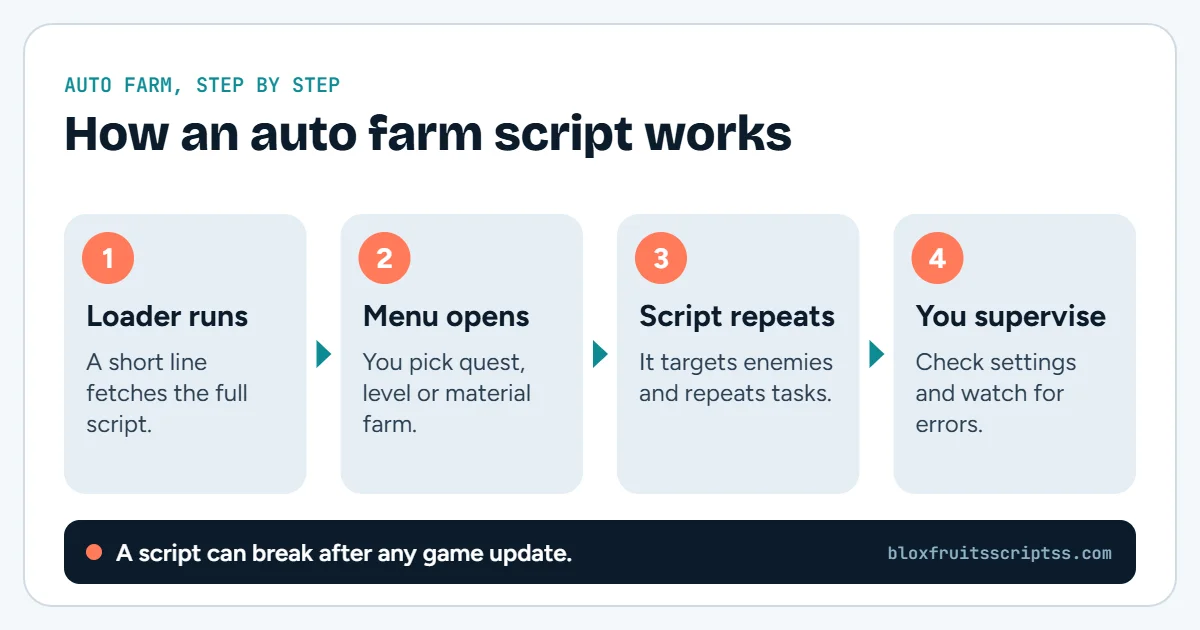
Understanding Auto Farm Options
Farming menus may use similar names for different actions. Read each option’s description before assuming what it does. The features below explain common farming terms, rather than a confirmed feature list for both loaders. A hub may include only some of these options.
Auto Quest and Level Farming
Auto quest is meant to handle the repeated quest cycle. It may select a quest, move toward its targets, and collect another quest afterward. This can reduce repeated trips between a quest giver and enemies when it works. Check that the active quest matches the enemies being attacked.
Auto Attack and Enemy Targeting
Auto attack is meant to repeat combat actions against a target. Enemy targeting decides which NPC, or computer-controlled character, the routine should attack. These functions need to work together for a farming loop to continue. Attacking nearby enemies does not necessarily mean the correct quest is progressing.
Mastery Farming
Mastery tracks progress with a specific weapon, fruit, or other supported item. It helps unlock moves and is separate from your character’s overall level. A mastery-farming option therefore needs to use the item you want to improve. Check that item’s mastery progress instead of watching only your character EXP.
Boss Farming
Boss farming focuses on a chosen boss instead of a normal quest route. A routine may try to find the boss and repeat the fight when available. Its usefulness depends on access, spawn conditions, and the script’s support. A boss-farming label does not guarantee a rare reward.
Material Farming
Material farming targets a particular resource needed for your goal. The routine needs to select enemies or activities that can provide that resource. This makes target choice more important than simply defeating many enemies. Check your material count to see whether the chosen task is useful.
How to Check Your Farming Settings
Start with one clear goal, such as quest progress or a chosen item’s mastery. Then compare that goal with the options the current script actually provides. Menu labels differ, so there is no single set of buttons that applies to every hub. The checks below help you understand the configuration without guessing at missing features.
- Choose the farming goal. Decide whether you want levels, mastery, a boss reward, or materials.
- Check your location. Confirm that the selected target is available in your current Sea.
- Review the quest. Make sure its requested enemies match the selected farming target.
- Check the combat item. Confirm that the selected sword, fruit, or fighting style is available.
- Look for conflicting tasks. Different routines may try to move your character toward different targets.
- Check actual progress. Watch the relevant quest counter, mastery value, or inventory count.
First Sea, Second Sea, and Third Sea Farming
Your farming settings need to match the area you can currently access. A target from another Sea will not become available simply because it appears in a menu. Access requirements and quest conditions still matter. Review saved targets whenever you change locations or farming goals.
| Area | Main configuration check |
|---|---|
| First Sea | Match the quest and enemy to your current progress |
| Second Sea | Review targets carried over from earlier settings |
| Third Sea | Check the exact boss, material, or quest target |
| After changing Seas | Confirm that saved locations and targets still apply |
Why Is My Auto Farm Script Not Working?
A farming problem can come from the source, game compatibility, or selected settings. A menu opening successfully only shows that part of the script loaded. It does not prove that quest selection, movement, and combat all work. Use the symptom below to narrow down what needs checking.
| Problem | Possible cause | What to check |
|---|---|---|
| Menu never opens | Source unavailable or loading error | Publisher’s current source and error message |
| Menu opens, but farming stays idle | Missing target or unsupported option | Selected farming mode and target |
| Character attacks the wrong enemies | Quest and target do not match | Active quest name and enemy selection |
| Character does not accept a quest | Access condition or quest routine issue | Whether the quest is available manually |
| Selected weapon is not used | Wrong item setting or failed equip action | Item name and inventory |
| Character keeps changing direction | Conflicting movement routines | Whether several farming tasks are active |
| Farming stops after an update | Script may need changes | Publisher’s update notes |
| Key is rejected | Invalid or expired access key | Publisher’s documented key process |
Avoid treating every error as a device problem. Lower graphics settings cannot repair a broken quest routine or missing source file. Likewise, switching targets cannot fix a loader that never downloads its code. If the publisher has no confirmed fix, leave that feature marked as unresolved.
Can Auto Farming Get Your Account Banned?
Yes, using exploit scripts can put your Roblox account at risk. Roblox states that cheating and exploiting violate its rules and can lead to account deletion. Its support page also warns that some exploit downloads contain malware or steal account details. A “keyless” or “anti-ban” label does not establish that a tool is safe.
Farming Without Scripts
You can make farming more focused by choosing a clear target before starting. For level progress, check that you have the matching quest before fighting enemies. For mastery, pay attention to the item you want to develop. For materials, plan around the required resource instead of choosing enemies at random.
Keep a simple record of what you need from the session. That might be a quest goal, a mastery move, or a material count. Recheck your progress before moving to another area. This helps you spot wasted effort without relying on automation.
Frequently Asked Questions
These questions cover limits that a loader or feature name may not explain. They also help separate access problems from farming problems. Script menus and requirements can change between releases. For that reason, judge the current source and behavior rather than an old screenshot.
Does Auto Farm Work While Roblox Is Closed?
A script running inside your Roblox session stops when that session closes. A loader does not create an offline farming service. Leaving a copied code snippet on your device does not keep it running. Claims of offline progress need a separate explanation and evidence.
Does “No Key” Mean Every Feature Is Free?
“No key” describes whether an access key is required. It does not explain every feature’s price or availability. A project could still offer separate paid tools or limited options. Read the publisher’s current terms before assuming everything is included.
Does a Working Loader Mean Auto Farm Works?
No, loading the script and completing a farming task are different checks. The interface may appear while one of its routines fails. Quest selection, movement, and attacks can each have separate problems. A working claim should identify the feature that was actually tested.
Can One Script Handle Both Levels and Mastery?
A script may offer both, but they are different farming goals. Level farming focuses on character progress, while mastery concerns a selected item. Support for one does not confirm support for the other. Check each mode’s settings and results separately.
Conclusion
A Blox Fruits auto farm script should be assessed against the task you need it to handle. Check its source, farming options, target settings, and current limitations. Keep published loader details separate from claims of tested performance. For a broader list of hubs, visit the complete Blox Fruits Script Collection.
Before you run anything: using scripts in Roblox breaks the Roblox Terms of Service and can lead to a ban. Use an alternate account and check every source yourself.
Keep reading
More Blox Fruits guides
Scripts for mobile
A Blox Fruits script for mobile is third-party code intended to add tools or automate tasks while you play on a…
Scripts for PC
A Blox Fruits script for PC is third-party code intended to add tools or automate actions inside the Roblox game….
Executors
A Blox Fruits executor is third-party software used to run scripts in the Roblox game client. The executor provides…
Delta script
A Delta Blox Fruits script is code that players want to run through Delta Executor while playing Blox Fruits on…